
How to Donate
There is no payment form on this website
Donations are made from the donation panel inside the game client. You pick a tier there, pay with PayPal or GCash, and tell the panel you have paid. Staff check it and your points are added to your account.
Nothing on this site takes a payment or asks for card details. Any page or person claiming to sell QQiROSE points outside the game client is not us.
Step 1 — Open the donation panel
Log in and open the Item Mall, then press Donate.
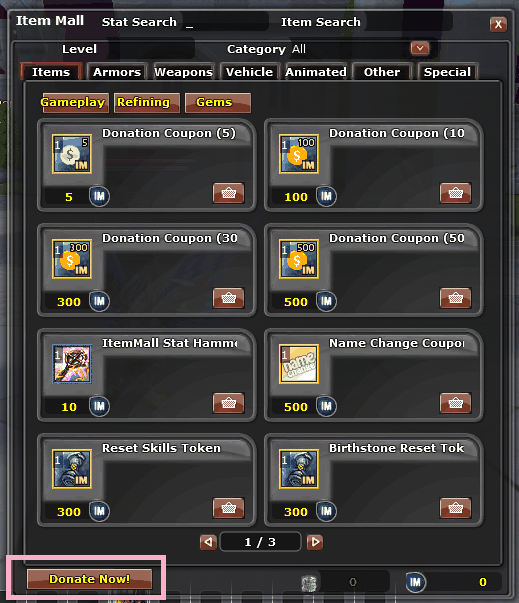 The Item Mall — Donate Now is at the bottom left.
Step 2 — Read the terms, then pick a method
The first page is the donation terms. Accept it and choose how you want to pay:
- PayPal — opens the payment page for that tier in your browser.
- GCash — shows the QR code in game, ready to scan with the app.
Step 3 — Pick your amount
Each tier has a fixed price and a fixed number of points. The amounts shown in the panel come from the server, so what you see in game is always the current one.
| PayPal | GCash | Points |
|---|---|---|
| 10 USD | 600 PHP | 900 |
| 20 USD | 1,200 PHP | 2,000 |
| 50 USD | 3,000 PHP | 6,000 |
| 100 USD | 6,000 PHP | 13,000 |
| 200 USD | 12,000 PHP | 30,000 |
| 500 USD | 30,000 PHP | 85,000 |
Step 4 — Pay, then press "I Have Paid"
Press the button on the payment page to open your PayPal link or show the GCash QR, and pay the amount for the tier you chose. Then come back to the game and press I Have Paid.
This step is the one that matters. If you pay and then close the window without pressing it, nothing reaches the staff queue and there is no record of your donation to approve.
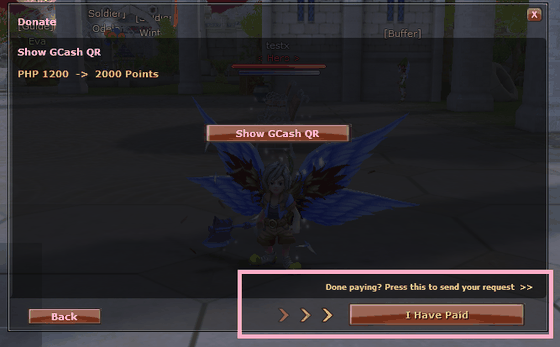 The button only appears once you have opened the payment
link or the QR — and the arrows are pointing at it for a reason.
The button only appears once you have opened the payment
link or the QR — and the arrows are pointing at it for a reason.
Step 5 — Enter your reference and confirm
Type your own PayPal or GCash reference number — the one from your receipt — and press Confirm. The window closes and a line appears in your chat confirming the request was sent.
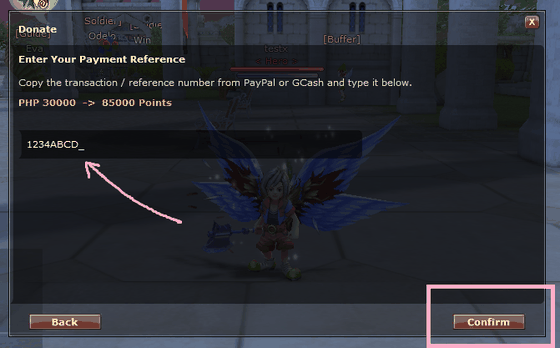 Type the reference from your receipt, then Confirm.
That is what sends the request.
Type the reference from your receipt, then Confirm.
That is what sends the request.
Step 6 — Wait for approval
Staff are notified as soon as your request arrives. Once it is approved the points are added to your account and you get a message in game. You can watch the request yourself with Show Donation History in the donation window.
- You can have up to 3 unresolved requests at a time.
- There is a short wait between submissions, so send one request per payment.
- Points are added to your account, not to a single character.
Something went wrong?
If you paid but pressed the wrong tier, forgot to press I Have Paid, or your points have not arrived, come to Discord with your account name and your payment reference. Keep your receipt — the reference is how a donation is matched to you.
Thank You
Donations pay for the server, the domain and the hours that go into QQiROSE. The game stays free either way — nothing here is required to play.
Need Help?
Ask in Discord before you pay if anything is unclear.
