
The FFA Arena
Level 280 PvP, right now, on any character
The free-for-all arena hands you a ready-made level 280 character of the class you pick, geared and dropped straight into the fight. It costs nothing, it takes one keypress, and you can be level 1 when you do it.
The arena character is a throwaway. Your real character is never touched — not its level, not its stats, not its bag. Nothing that happens in the arena is saved to it.
Step 1 — Press R, or the crossed swords
In game, press R. You can also click the crossed-swords button on the menu at the bottom right of the screen — both open the same window.
 The arena button, bottom right of the screen.
Prefer a different key? Rebind Free PvP under Options → Key Bind.
Step 2 — Accept, then pick a class
Read the notice and press Yes, let's fight!.
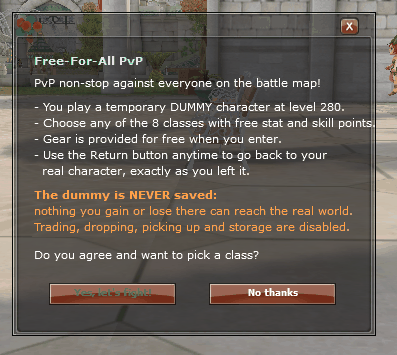 What you are agreeing to: a temporary dummy character that
is never saved.
What you are agreeing to: a temporary dummy character that
is never saved.
Then pick your class — all twelve are there, the new ones included:
- Knight, Champion, Cleric, Mage, Raider, Scout, Bourgeois, Artisan
- Fencer, Shaman, Hunter and Gunslinger
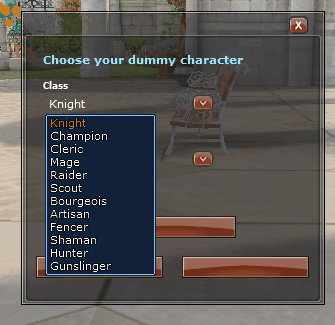 You arrive at level 280 with free stat and skill
points to spend as you like.
You arrive at level 280 with free stat and skill
points to spend as you like.
Step 3 — Fight
The arena is full PvP for everyone in it. There are no safe zones, no consent prompts and no penalty for dying — the whole point is to try builds and fight people without risking anything.
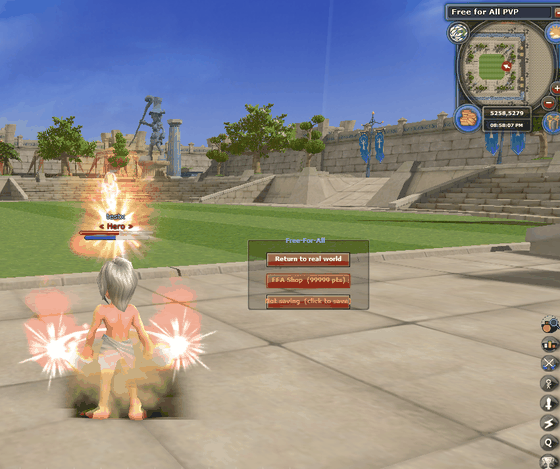 The arena, with the Free-For-All panel on the right of your
screen — return, shop, and whether this dummy is being saved.
The arena, with the Free-For-All panel on the right of your
screen — return, shop, and whether this dummy is being saved.
Step 4 — The arena shop
Inside the arena you are given FFA points and a shop of your own to spend them in, on the button below the return button. It is stocked with gear so you can re-kit and try something else mid-session.
FFA points and anything bought with them exist only for that session. They are not real Item Mall points and nothing bought there can follow you out.
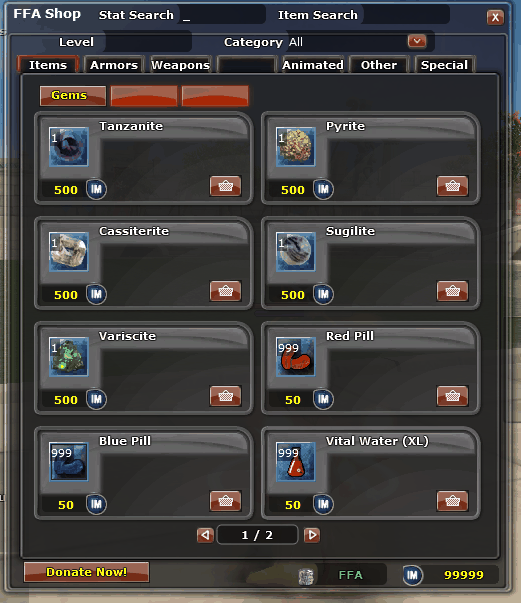 The arena shop — gems, pills and gear, paid for in FFA
points. Note the currency reads FFA, not Item Mall points.
The arena shop — gems, pills and gear, paid for in FFA
points. Note the currency reads FFA, not Item Mall points.
Step 5 — Return to the real world
A Return to real world button floats on screen the whole time you are in the arena. Press it, confirm, and your own character comes back exactly as you left it.
Walking or warping out of the arena does the same thing automatically, so you can never end up wandering the world as an arena character.
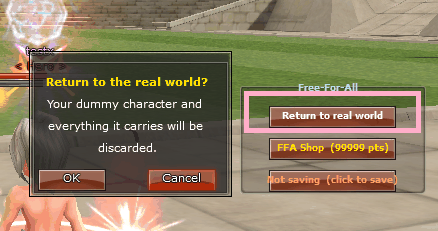 It asks first — the dummy and everything on it are
discarded when you say yes.
It asks first — the dummy and everything on it are
discarded when you say yes.
Keep a dummy — three preset slots
Spent an hour getting a build right? Keep it. The Free-For-All panel shows Not saving (click to save) — click it and this dummy is kept in one of your three slots, with its gear, its bag arrangement and its hotkey bars.
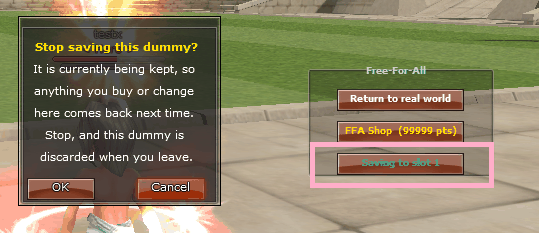 Click again to stop saving — then this dummy is
discarded when you leave, like any other.
Click again to stop saving — then this dummy is
discarded when you leave, like any other.
Next time, press Load Preset on the class screen and pick the slot. It comes back exactly as you left it, still saving to the same slot.
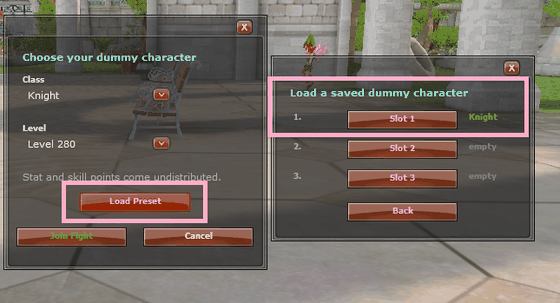 Three slots, each remembering the class it holds.
What the arena will not let you do
The arena character is free gear at level 280, so it is sealed off from everything that touches the real game:
- Nothing leaves. No trading, storage, gifting, vending or mailing arena items out — and a real character standing in the arena cannot pick them up off the ground either.
- No real Item Mall while you are in the arena; you get the arena shop instead.
- No quests, achievements or arena events on an arena character — those all belong to the real you.
- Costumes are not carried in, for the same reason.
None of this affects your real character. It is only there so that an hour in the arena cannot turn into free level 280 gear in the world.
Not sure what to play?
That is exactly what it is for. Try a class in the arena before you spend weeks levelling one — see the Guides for how the classes differ on this server.
Try It Now
Any character can enter, at any level. Get the client, make an account, press R.
Find Opponents
Arrange a session in Discord — the arena is best when it is busy.
