
Features
This is not stock ROSE
The QQiROSE client and server have both been rewritten in places. Some of it is new content — four extra classes, custom skills, arenas. Most of it is the hundred small things the original never had: talking to your party, selling while you sleep, binding your own keys, and a client that actually runs fast.
Everything below is in the live client. Nothing here needs a donation, an add-on or a third-party tool.
Classes & Skills
-
Four new classes
Fencer, Shaman, Hunter and Gunslinger join the eight originals, each with their own kit.
-
Custom skills
Skills the original game never had — blink teleports, real fired arrows, stealth, new passives and money-stealing strikes.
-
Reborn
Hit the cap and start again stronger, keeping what you earned.
-
Rebalanced combat
Fixed hit frames, honest skill success rates, working shared cooldowns and PvP damage brought back to classic numbers.
-
Stats worth spending
Level 280 cap, a 400 stat cap and tooltips that tell you what a point actually does before you spend it.
-
Skills on any map
The old melee-only map restriction is gone — your build works everywhere.
PvP & Arenas
-

FFA arena
One keypress puts you in a level 280 geared character for free-for-all PvP, with its own shop. How it works.
-
Always-on PvP
Dedicated PvP zones with no consent dance, and /pkwhy to tell you exactly why a hit did what it did.
-
Duels & spectating
Challenge anyone anywhere, and let your friends watch the fight.
-
Game Arena events
Scheduled events you sign up for, running through the day.
-
MOBA arena In testing
A DOTA-style lane mode built inside ROSE — creeps, towers, kill feed and a top-down camera.
-

Rankings
Live Level, Clan and Zulie boards with a name search. See how.
Talking & Playing Together
-

Voice chat
Talk to your party or your clan with the microphone built into the client. No Discord call needed to run a dungeon.
-
Chat with Discord from in game
The client has its own Discord chat tab. Start a line with % and it lands in our Discord channel; anything said there comes straight back into your chat window. Friends who are not logged in can still talk to the people who are.
-
Who is talking
A panel shows who currently has the mic open, by name, so you know who you are hearing.
-
Mute anyone
/shut silences a player for you — voice and text — without needing staff.
-
Emoji & macros
Emoji in chat and your own macro buttons for the lines you type all day.
-
Chat that behaves
The chat-room tab is back, with optional timestamps so you can see when something was said.
-
Play in your language
The client is translated, including full right-to-left Arabic.
Trading & Economy
-
Offline vending
Leave your shop running after you log out. Your stall keeps selling, and a moon badge tells buyers the owner is away.
-
Vending history
Come back to a full log of what sold, for how much, and to whom.
-

Drop browser
Look up any item and see exactly which monsters drop it — no wiki, no guessing.
-
Refining you can plan
Runes, visible rates and real crafting success numbers instead of rumours.
-
Gems, appraisal & re-rolls
Gems that override stats, doubled appraisal rolls, and a stat hammer that shows the re-roll before you commit.
-
Item Mall that finds things
Search, paging and a level filter, so the mall is browsable instead of endless.
-
Account tokens
Change your name, reset your stats or skills, re-pick your birthstone, or wear a custom title.
-
Expandable inventory
Your bags are not stuck at one page any more — each tab can be expanded up to five pages of thirty slots, so you can carry a farming trip home in one go instead of running back to storage.
-
Stacks of 9999
Bigger stacks, an inventory lock so you cannot sell the wrong thing, and one-click sorting.
Pets & Summons
-
Summon control
Tell your summons what to do — follow, hold, attack your target — instead of watching them wander off.
-
Four pets, with stats
Keep four pets that actually carry stats, follow properly and stay on their leash.
-
Collector pets
Filter what your pet picks up so it brings back loot and not litter.
Wings & Style
-
Flight
Equip a pair of wings and a fly button appears. Take off and you are actually in the air — other players see you up there, you can climb and dive, and you can fight while flying. Ground-only skills stay ground-only, so it is a way to travel and to duel, not a way to cheat.
-
Paint your gear
Dye your equipment yourself with the Item Paint window. Two colour channels plus a per-part colour balance mean you tune each piece until it matches, instead of picking from a handful of presets.
-
The colour follows the item
The paint is stored on the item itself, so it survives trading, vending, storage and gifting — what you sell is the colour the buyer gets.
Comfort & Control
-
In-game key binds
A real Key Bind tab in Options. Rebind movement, skills, jump and every custom window — no ini editing.
-
More game options
New Misc, Sound and Effects tabs: sound categories with their own volumes, effect toggles, chat timestamps, an FPS cap and video sync.
-
Settings per character
Your options, hotbars and quickbars are remembered per character, not smeared across the whole account.
-
EXP lock
Stop your experience where you want it and keep the level you are on.
-
Quest tracker
Thirty quest slots and an on-screen tracker that survives relogging.
-
Get there faster
Teleport from the world map, click-to-move pathfinding that walks around obstacles, and a save-town revive that works.
-
Seamless reconnect
Dropped connections put you back where you were instead of dumping you at the login screen.
-
FPS & ping on screen
A small HUD showing framerate and latency, so "is it me or the server?" has an answer.
A Fast Client
-
Built for high FPS
The renderer was profiled and rebuilt where it hurt — terrain culling, draw batching and distance culling. Modern machines run this client at up to 600 frames per second.
-
Loads in about a second
The loading screen went from roughly ten seconds to about one.
-
Looks better too
Enhanced water, fixed depth so surfaces stop flickering, glow that fades with distance, and refine glow on the character-select screen.
-
Launcher & patcher
The launcher patches you to the current build before you play, so an update is one click.
Arcade Cabinets In testing
Real arcade games, running inside the ROSE client — sit at a cabinet, play, and let other players watch or challenge you. Fighting games get head-to-head matches over the network.
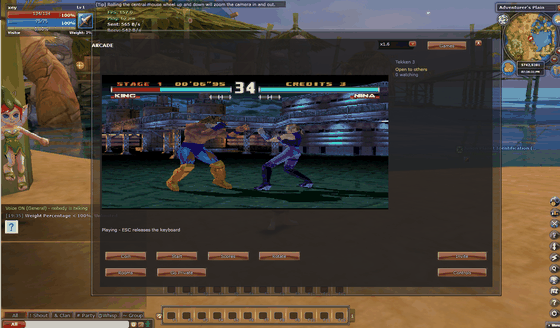 A cabinet in game — your character, your chat and the world
are all still there behind it. Coin, Start, Rooms, Invite and Controls are the cabinet's
own buttons.
A cabinet in game — your character, your chat and the world
are all still there behind it. Coin, Start, Rooms, Invite and Controls are the cabinet's
own buttons.
Your Account, In the Client
-
Sign up in game
Create your account on the login screen, with a verification image sent by the server. How to register.
-
Change your password
Done from character select, using the security answer you chose. No web form, no e-mail round trip.
-
Donate in game
The donation panel is in the client, with your own request history. How it works.
Missing something?
This list grows most weeks, and a lot of it started as someone asking. If there is a feature you want, say so in Discord.
Try It
All of it is in the free client. Download, sign up in game, and you are playing in a few minutes.
Community
Feature requests and bug reports live here.
