
Downloads
QQiROSE Online — Full Client
Everything you need in one archive. Download it once; after that the launcher keeps the game up to date on its own.
Three mirrors: MediaFire, Google Drive and MEGA — same archive, use whichever is faster for you. More mirrors are posted in Discord.
Play in your Browser or on Mobile — live now
No Windows PC, no installer, no drivers. QQiROSE now runs in a web browser and on Android, against the same server as the PC client — same characters, same world, same everything. We are the first iROSE server to release this.
- Play in your browser Open a tab on any PC, laptop, Mac, phone or tablet and you are in game. Nothing to download, nothing to install. Play Now in Browser web.qqirose.com
- Play on Android The mobile app, built for touch controls. Grab the APK and install it — the walkthrough is right below. Download the APK (MediaFire) QQiROSE-web-mobile v1.2.2
Pre-download everything — strongly recommended
The first time you play, the client asks whether it may save the game data on your device. Say yes and let it download all seven packs. Nothing is sent anywhere — the data stays on your device and you can clear it any time.
Anything you skip has to be fetched while you are playing, which causes pauses and stuttering as you move into new areas. Download it once and the game loads faster, uses less data every time after, and plays smoothly.
- 1. Say yes, then "Choose what to save"
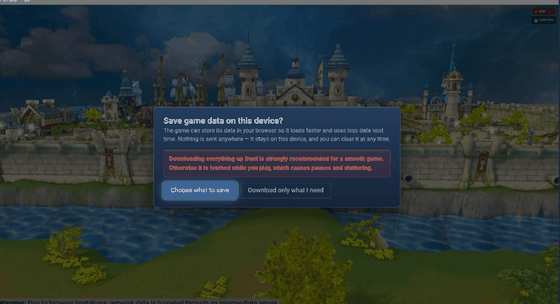 Pick Choose what to save rather than "Download only what I need".
 - 2. Tick every pack, then Download selected
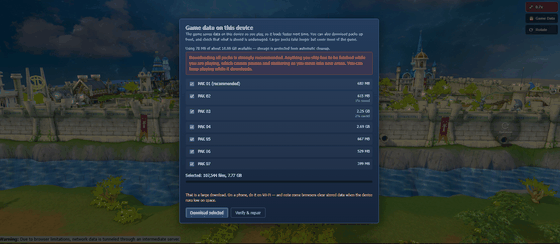 All seven packs together are about 7.8 GB. You can keep playing while
it downloads, and Verify & repair re-checks the stored data later.
All seven packs together are about 7.8 GB. You can keep playing while
it downloads, and Verify & repair re-checks the stored data later.
It is a big download — on a phone, do it on Wi-Fi. If you close the tab or the app part-way it simply picks up where it left off. You can reopen this panel any time from the Game Data button in the top right corner.
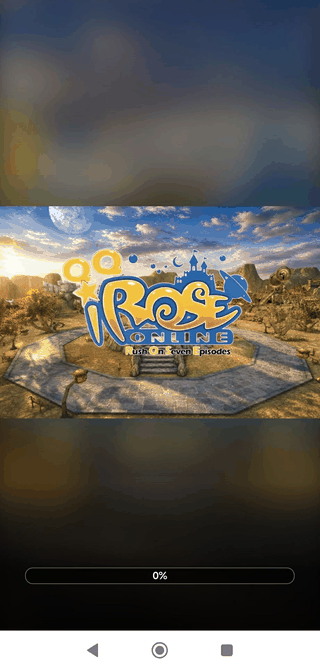 Let the bar finish before you play.
Installing the Android app — and why it is safe
The APK is not on the Play Store, because private-server game clients are not allowed there. That is the only reason. It is built by us, hosted by us, and it is the same client the browser version runs — it talks to qqirose.com and nowhere else.
Android shows a warning for any app that did not come from the Play Store, so you will see one. Your phone still scans the file before it installs it, and QQiROSE passes clean:
- 1. Tap the APK
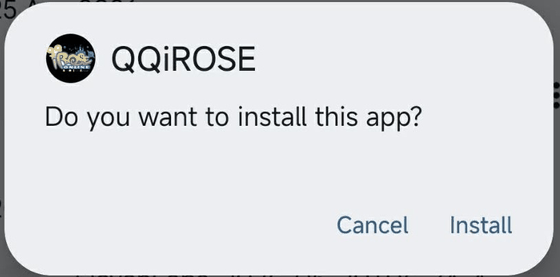 Open the downloaded file and tap Install. If your phone asks, allow
installs from your browser or file manager.
Open the downloaded file and tap Install. If your phone asks, allow
installs from your browser or file manager. - 2. Let it install
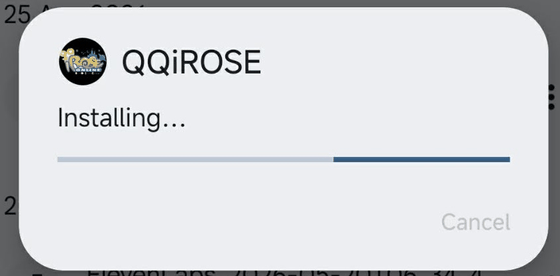 It takes a few seconds. Do not close the dialog.
 - 3. It passes the scan
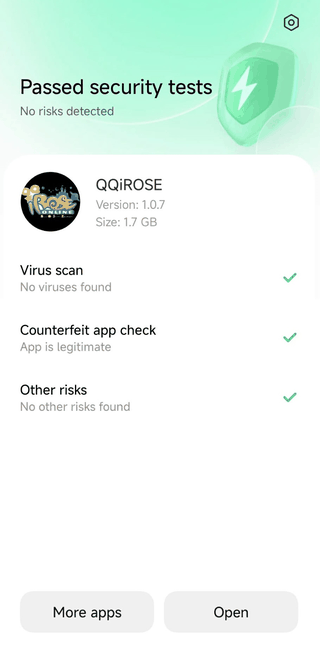 No viruses. No risks. App is legitimate. Tap Open, then let it
pre-download the game data.
No viruses. No risks. App is legitimate. Tap Open, then let it
pre-download the game data.
Only ever install the APK from the link on this page or from our Discord. Anything calling itself QQiROSE anywhere else is not us.
Drivers & Runtimes
Only needed if the game refuses to start. The usual symptoms are a d3dx9_*.dll is missing error, a DirectX error on launch, or a VCRUNTIME140.dll / MSVCP140.dll is missing or "runtime error" message. Install these, reboot, then run the game again.
All three come straight from Microsoft. Install the x86 Visual C++ runtime even on 64-bit Windows — the game is a 32-bit program and that is the one it needs; x64 is only there for the launcher's sake. If your extracted client folder has a drivers folder, the same installers are already in there — run them from there instead.
Installing
- Download the archive using the button above.
- Extract it anywhere — your Desktop is fine. Do not run the game from inside the archive; extract it first.
- Run the launcher. It patches itself and the client automatically.
- Press Sign Up on the login screen to create your account (step-by-step guide), then play.
If the game will not start
- Extract it properly. Running straight from the .rar is the single most common cause.
- Install DirectX 9.0c. ROSE needs the older DirectX runtime; having DirectX 12 does not include it.
- Do not put it in Program Files. Windows restricts writes there and the patcher needs to update files.
- Allow it through your antivirus. Self-patching launchers are often flagged by heuristics.
System requirements
- OS — Windows 7 or newer
- CPU — any dual core; the client is single-thread bound
- Memory — 2 GB
- Graphics — anything with DirectX 9.0c support
- Disk — about 3 GB
The client has been heavily optimised — 600 FPS on hardware that ran the original at around 40.
New Here?
Accounts are made inside the game, not on this site. The guide walks through it with pictures.


